CodideX Core vs CodideX Mobile: What is the Difference?
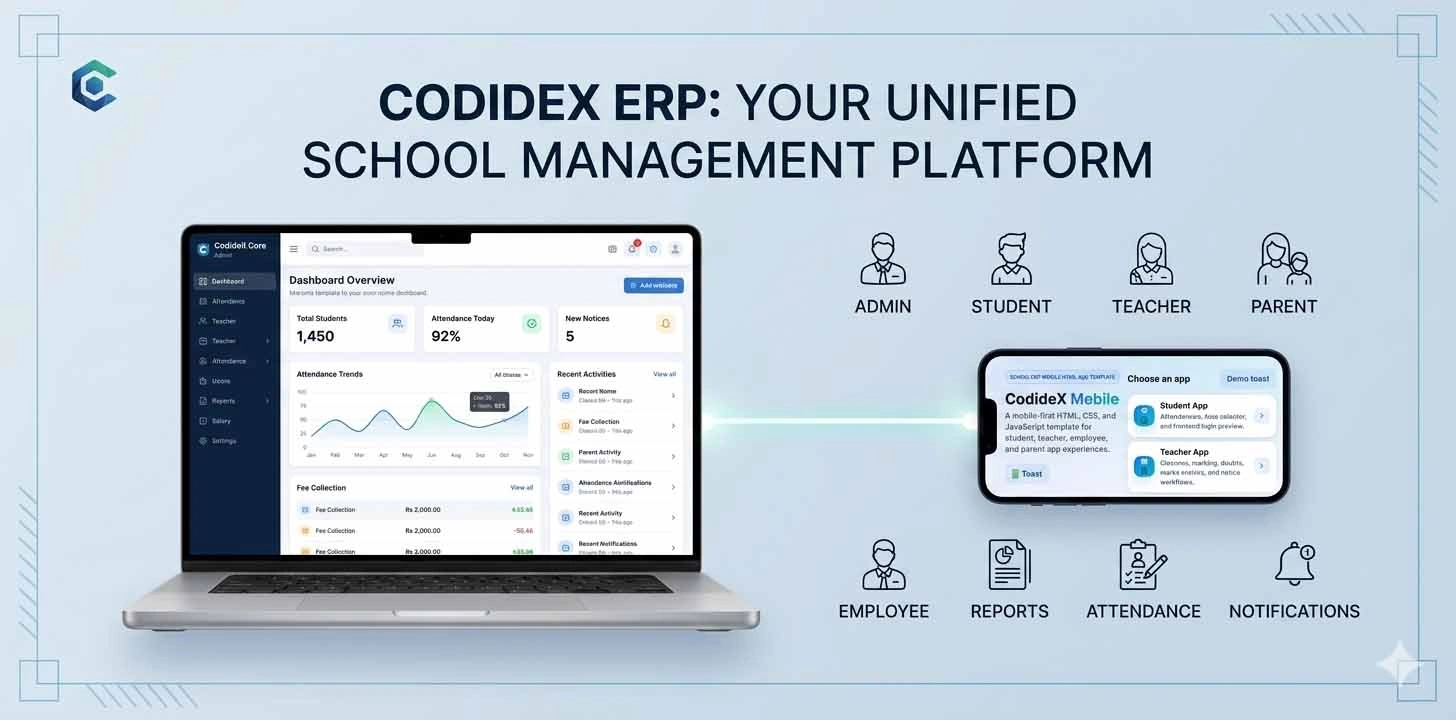
Leave a commentCodideX Core and CodideX Mobile are designed for different purposes within the same School ERP ecosystem. CodideX Core focuses on desktop-style admin and ERP management pages, while CodideX Mobile focuses on mobile-first interfaces for students, teachers, employees, and parents.
Modern School ERP systems are no longer used only by administrators sitting in an office. Today, schools need different types of interfaces for different users. Admin teams may need a powerful desktop dashboard, while students, teachers, employees, and parents may need simple mobile-friendly screens for quick access.
This is why CodideX is planned as more than one template experience.
CodideX Core and CodideX Mobile are designed to work as two separate but connected parts of the same School ERP design ecosystem. Both are created under the CodideX brand, but their purpose, layout, and target users are different.
Understanding this difference helps developers choose the right starting point for their project.
What is CodideX Core?
CodideX Core is the main School ERP HTML template. It is designed for desktop-style ERP administration and management interfaces.
It focuses on the larger admin-side experience where school administrators, office staff, accounts teams, academic coordinators, and management users need detailed pages, tables, forms, reports, settings, and controls.
CodideX Core is suitable for building the main backend/admin interface of a School ERP system.
It can include sections such as:
- Dashboard
- Student management
- Staff management
- Attendance
- Fees
- Exams
- Reports
- Library
- Inventory
- Medical records
- Settings
- Users and roles
- Print-friendly pages
- Utility pages
- UI components
In simple words, CodideX Core is the main control center design for a School ERP project.
Who Should Use CodideX Core?
CodideX Core is useful for developers and teams who want to build a complete School ERP admin system.
It is suitable for:
- School ERP developers
- Education software companies
- Freelancers building school management projects
- Institutes needing an admin dashboard
- Teams building custom ERP software
- Developers who want a ready HTML front-end foundation
Since CodideX Core is an HTML template, developers can connect it with any backend technology such as PHP, Laravel, CodeIgniter, ASP.NET, Node.js, Python frameworks, or other custom systems.
What is CodideX Mobile?
CodideX Mobile is a separate mobile-first HTML template ecosystem. It is designed for users who need quick and simple access from mobile devices.
Instead of being a large desktop admin panel, CodideX Mobile focuses on mobile app-style screens.
It is planned for different user groups such as:
- Students
- Teachers
- Employees
- Parents
Each user type needs a different mobile experience.
For example, a student may need to view attendance, notices, results, study materials, and doubt-clearing messages. A teacher may need to manage class updates, attendance, replies, and student-related tasks. A parent may need to see child information, fees, attendance, notices, and communication. An employee may need leave requests, approvals, and staff-related functions.
CodideX Mobile is designed for these kinds of mobile-first user journeys.
Why Separate Core and Mobile?
A desktop ERP interface and a mobile interface should not be treated the same.
Desktop screens can show more information, larger tables, filters, reports, settings, and detailed forms. Mobile screens need simpler navigation, compact cards, quick actions, and user-focused pages.
If one design tries to serve both desktop admin and mobile app-style users in the same way, the experience may become confusing.
This is why CodideX separates Core and Mobile.
CodideX Core gives developers a strong desktop ERP foundation. CodideX Mobile gives them mobile-first templates for different ERP users.
Key Difference 1: Purpose
CodideX Core is for ERP administration and management.
CodideX Mobile is for mobile-first user access.
CodideX Core helps manage the system. CodideX Mobile helps users interact with the system conveniently from mobile devices.
Key Difference 2: Target Users
CodideX Core is mainly for:
- Admin
- Management
- Office staff
- Accounts staff
- Academic coordinators
- System users with control access
CodideX Mobile is mainly for:
- Students
- Teachers
- Employees
- Parents
This difference is important because each user group needs different screens and actions.
Key Difference 3: Layout Style
CodideX Core uses a desktop admin dashboard style. It can include wide tables, sidebars, report pages, large forms, printable sections, and detailed settings.
CodideX Mobile uses a mobile app-style layout. It focuses on bottom navigation, compact cards, simple lists, quick actions, profile summaries, and touch-friendly screens.
Both have the same brand direction, but the interface style is different.
Key Difference 4: Module Depth
CodideX Core can support deeper modules because admin users need more control. For example, fee reports, exam setup, staff records, inventory, settings, users, roles, and print systems are more suitable for Core.
CodideX Mobile focuses on selected user actions. It should not overload mobile users with every admin feature.
For example:
- Student mobile UI may show attendance, results, notices, study materials, and profile.
- Teacher mobile UI may show assigned classes, attendance, student communication, and doubt replies.
- Parent mobile UI may show child profile, fees, attendance, notices, and communication.
- Employee mobile UI may show profile, leave status, and approval tasks where applicable.
Key Difference 5: Development Use
Developers can use CodideX Core as the base for the main ERP admin system.
They can use CodideX Mobile as a separate front-end template for mobile-facing user panels or app-style web views.
Both can connect to the same backend database and API system in a real project, but they are designed as separate template products.
Can CodideX Core and CodideX Mobile Work Together?
Yes. In a real School ERP project, CodideX Core and CodideX Mobile can work together.
A possible structure can be:
- CodideX Core for admin and management
- CodideX Mobile Student UI for students
- CodideX Mobile Teacher UI for teachers
- CodideX Mobile Employee UI for staff users
- CodideX Mobile Parent UI for parents
The backend can be shared, while the front-end interface can be different for each user type.
This gives a cleaner experience for every user.
Why Developers May Need Both
A school ERP project often needs both desktop and mobile experiences. Admin staff may use desktops or laptops for detailed work, while students and parents may use mobile phones.
If developers have only a desktop template, the mobile experience may feel heavy. If they have only a mobile template, the admin system may lack depth.
Using both CodideX Core and CodideX Mobile can help developers build a more complete product ecosystem.
How CodideX Helps Build Faster
CodideX is created to reduce the starting effort for developers.
CodideX Core helps with:
- Admin dashboard structure
- ERP module organization
- Forms and tables
- Reports
- Settings pages
- Utility pages
- Print-friendly layouts
CodideX Mobile helps with:
- Mobile-first user screens
- Student UI
- Teacher UI
- Employee UI
- Parent UI
- App-like navigation
- Compact profile and activity pages
Together, they can save development time and improve design consistency.
Which One Should You Choose?
Choose CodideX Core if you are building the main admin or ERP management panel.
Choose CodideX Mobile if you are building mobile-first screens for students, teachers, employees, or parents.
Choose both if you want a more complete School ERP design ecosystem with desktop and mobile interfaces.
Conclusion
CodideX Core and CodideX Mobile are designed for different but connected purposes.
CodideX Core is the main desktop ERP admin template. CodideX Mobile is the mobile-first template ecosystem for different school ERP users.
Both are useful for developers who want to build modern education software faster and with better organization.
By separating desktop ERP management from mobile user experience, CodideX provides a more practical and professional approach to School ERP interface design.